



































Building blockchain apps used to mean hiring experienced developers, managing infrastructure, and understanding smart contract languages. For most people, that complexity made Web3 feel out of reach. Today, the landscape has changed dramatically.
Beginner-friendly tools now guide users from concept to deployment. Whether it’s a smart contract builder in your browser or a CLI wizard that walks you through launching a blockchain, these tools make Web3 development far more accessible. With pre-built templates, visual dashboards, and step-by-step prompts, even small teams or solo creators can launch real products.
AI coding tools like Cursor, Replit, and Bolt.ai lower the barrier even further. They help users write, test, and refine code through natural language prompts. These assistants don’t replace the need to learn—but they let anyone move faster, with fewer mistakes, and greater confidence.
This article explores how six blockchain ecosystems—Hedera, Ethereum, Constellation, Avalanche, XDC, and Algorand—are simplifying development for beginners. It also explains how pairing these tools with AI makes it possible for almost anyone to launch in Web3, no deep technical skills required.
Hedera: Build Smart Contracts and dApps in Your Browser
Hedera Hashgraph offers a fast, low-cost network designed for scalable real-world applications. It also provides one of the most beginner-friendly development experiences in Web3—especially for users who are just getting started.
Hedera Contract Builder: Click, Customize, Deploy
The Hedera Contract Builder is a browser-based platform that lets you create and deploy smart contracts using pre-built Solidity templates. You can choose from HTS and well-known standards like ERC-20, ERC-721 and configure common parameters using a simple form interface.
Once configured, you can compile and deploy the contract directly to the Hedera testnet with just a few clicks—no wallet or command line setup required. The platform integrates with Sourcify for contract verification and HashScan for transaction visibility.
For non-developers, this removes a massive technical barrier. It allows creators and startups to test token models and smart contracts without writing or deploying code manually.
2) The fastest way to bring your smart contract ideas to life…no local setup required! ⚡️
— Hedera (@hedera) May 12, 2025
Developed in collab with @KabilaApp, Hedera Contract Builder provides built-in templates and support for HTS and well-known standards like ERC-20, ERC-721, all under a single UI – designed… pic.twitter.com/QvrhFGv3Ry
Kabila Developer Playground: Learn Web3 with Java and JS
The Kabila Developer Playground complements the Contract Builder by offering an interactive coding environment in the browser. It supports JavaScript and Java, making it approachable for Web2 developers transitioning into Web3.
You can mint tokens, send transactions, or interact with Hedera’s Consensus Service using real SDK commands—all with live feedback and visual outputs. It’s ideal for experimenting with logic or walking through tutorials with real code in a safe environment.
Kabila also supports in-browser sharing, which makes it a good fit for team collaboration, classroom education, or showcasing proof-of-concept apps.
1/3 📢 Introducing Hedera Developer Playground – an open-source browser-based app for developers to learn and experiment on the Hedera testnet without the need for any local setup, developed in collaboration with @KabilaApp.
— Hedera (@hedera) January 23, 2025
Whether you're just starting out or you're an… pic.twitter.com/4w7XPbcZQv
How AI Tools Boost Usability
AI assistants work perfectly alongside Hedera’s beginner tools. For example, with many AI tools like Grok, Claude, Cursor, Replit, or Bolt you can describe your desired smart contract—“create a token with mint, burn, and freeze capabilities”—and let the AI generate the Solidity code for you.
You can then paste that code directly into Hedera’s Contract Builder to deploy it without needing to understand every line.
AI tools also help explain code behavior line by line. This is particularly helpful when adapting HTS-specific logic or modifying templates for new use cases. Paired together, Hedera and AI coding assistants give first-time builders the power to launch real apps quickly and with confidence.
Ethereum: Templates, IDEs, and AI-Powered Simplicity
Ethereum remains the most widely used smart contract platform, and its ecosystem includes some of the most polished tools for both learning and deploying. While Ethereum is known for its complexity, the right combination of browser-based IDEs, visual generators, and AI assistance makes it surprisingly beginner-accessible.
Remix IDE: Deploy Smart Contracts in Your Browser
Remix IDE is a web-based development environment for writing, testing, and deploying Solidity contracts. It requires no local setup and works directly in your browser. Remix includes integrated tools for compiling, debugging, and analyzing contracts, as well as connecting to MetaMask for deployments to testnets like Goerli or Sepolia.
Beginners can use example templates to get started and explore how Ethereum contracts work by editing them in real time. The plug-in system allows easy access to verification, gas estimation, and runtime analysis without writing custom scripts.
Remix lowers the barrier for anyone looking to deploy their first smart contract without installing developer tools or running a node.
OpenZeppelin Wizard: Audited Contracts with Multi-Chain Support
The OpenZeppelin Contracts Wizard is a browser-based tool that helps you generate secure, audited smart contract code using a visual interface. It simplifies the creation of standard contracts—like ERC‑20, ERC‑721, ERC‑1155, Governor (for DAOs), and even multi-token or meta-transaction systems—with point-and-click configuration.
Key Features
- Standard tokens & governance: Create ERC‑20, ERC‑721, ERC‑1155, and DAO contracts
- Upgradeable contracts: Choose between Transparent or UUPS proxy models
- Access control: Add role-based permissions, pausing, and minting capabilities
- Meta-transactions & account abstraction: Options for ERC‑4337 support
Once you configure your contract, the Wizard outputs ready-to-use Solidity code, all backed by OpenZeppelin’s audited libraries.
Cross-Chain & Bridging Support
Starting with its latest version (5.2+), the Wizard offers experimental support for cross-chainable tokens using ERC‑7802 and OpenZeppelin’s Axelar-based bridging integrations. It also supports the CrossChainEnabled abstract contract for bridging governance functions across chains. This makes it easier to build interoperable contracts that work across EVM-compatible networks like Ethereum, Polygon, Optimism, and emerging ecosystems such as Sei EVM.
The Wizard thus provides a single, unified interface to generate contracts that are secure, audited, upgradeable, and ready for multi-chain deployment—all without manual coding or library setup.
The OpenZeppelin Wizard is going cross-chain⛓️
— OpenZeppelin (@OpenZeppelin) March 14, 2025
We’ve introduced support for ERC‑7802 to enable standardized cross-chain communication.
Additionally, the @Optimism SuperchainERC20 is available to leverage asset interoperability within the Superchain 🔴https://t.co/xI0vN1bNgU pic.twitter.com/WwdC3MrxtT
AI + Wizard Integration
When paired with AI-powered coding tools like Cursor or Replit, the Wizard becomes even more powerful. You can describe your needs (“an ERC‑20 that’s mintable, pausable, and cross‑chain”) and use AI to generate the corresponding Wizard settings or add custom logic. Then, copy the resulting code into Remix or Hardhat for deployment—while AI helps explain or adapt it to your project.
Constellation Network: Launch a Custom Blockchain with Euclid SDK
Constellation Network allows anyone to deploy custom networks—called metagraphs—using guided tooling and modular templates. With the Euclid SDK, users can create scalable, production-ready Layer 1s without building core infrastructure themselves.
Constellation Network offers a unique way to build on blockchain using what it calls metagraphs—custom blockchains built for specific apps, industries, or data types. Instead of writing smart contracts on a shared chain, you launch your own chain designed for your needs.
Euclid SDK: Your Toolkit for Metagraphs
Constellation’s Euclid SDK and Hydra CLI give you everything needed to create and run a metagraph. These tools are designed to simplify blockchain development and reduce setup time.
With this toolkit, you can:
- Start from templates for NFTs, tokens, and data applications
- Customize logic and rules to fit your use case
- Test your metagraph locally or deploy it to the public network
- Use a built-in dashboard to monitor transactions and health
The Hydra CLI handles project creation, builds, deployments, and upgrades—all from the command line. It connects directly with the Euclid SDK to streamline every step. Together, these tools provide a reliable path from idea to live application.
You don’t need to manage complex infrastructure. Everything runs through Docker, and templates include dashboards, consensus modules, and integration examples. If you’re building for data verification, IoT, loyalty programs, or private asset tracking, metagraphs offer flexibility that traditional smart contracts don’t.
Templates Help You Start Fast
The SDK includes sample applications ready to deploy. These cover NFTs, DAO voting, data ingestion, and payment flows. Each template comes with built-in web UIs and a real-time metrics dashboard. Developers can launch these examples and edit the logic to fit their needs.
One popular example is the NFT Collection template, which supports minting, wallet integration, and asset indexing. The included React dashboard lets users mint and view NFTs right from their browser.
Other templates help build:
- On-chain voting platforms
- IoT data validators
- Application-specific consensus chains
These examples give first-time users a working foundation they can build on immediately.
Scale with Remote Deployments and Monitoring
After local testing, metagraphs can be launched in production environments. Euclid supports remote deployment using Ansible playbooks. These scripts set up multi-node clusters across cloud machines with minimal manual input. The process automatically installs all necessary packages, links nodes, and starts the network.
The SDK also includes monitoring support through Prometheus and Grafana. These tools give builders real-time visibility into node performance, transaction throughput, and system health.
Production environments only require SSH access and Docker-compatible servers. Once configured, the Hydra CLI handles the rest, from genesis block creation to uptime monitoring.
Avalanche: Launch a Custom Subnet with a Step-by-Step Toolkit
Avalanche makes it easy to create your own blockchain using subnets—independent networks that run in parallel with the Avalanche mainnet. These subnets are useful for games, institutional use cases, or region-specific applications. With clear tooling and command-line guidance, deploying a subnet is now accessible even to small teams or solo builders.
Avalanche-CLI: Guided Subnet Creation
The primary tool for launching subnets is Avalanche-CLI. This command-line tool walks you through the entire setup process. It helps you define the chain’s name, virtual machine (VM), validator rules, gas pricing, token parameters, and block production speed.
You don’t need to configure these elements manually. Instead, the CLI asks questions one at a time, then auto-generates the necessary files. You can deploy your subnet to a local machine or test it on Avalanche’s Fuji testnet.
Avalanche-CLI also supports exporting validator keys, simulating node networks, and connecting your subnet to external RPC endpoints. This makes it easier to test behavior before going live.
Interested in deploying a dApp on Avalanche?
— Avalanche🔺 (@avax) November 2, 2022
Use Avalanche-CLI to simplify your workflows!
✅ Deploy a Subnet in 60 secs
✅ Supports SubnetEVM w/ stateful precompiles
✅ Manage local Subnet deployments
✅ Compatible with Mac & Linux
Start building now: https://t.co/dabLMC6P0d pic.twitter.com/TTtTJciKBz
Avalanche Network Runner and Kurtosis
To simulate a full subnet locally, Avalanche offers two helpful tools: Avalanche Network Runner and Kurtosis.
Network Runner is a Go-based tool that spins up multiple nodes and simulates full cluster behavior. You can run transactions, observe node sync, and test consensus with near-mainnet realism. Kurtosis complements this by creating Docker-managed test environments with custom topologies and test cases.
Both tools help builders test edge cases, load scenarios, and uptime behavior before production deployment.
How AI Tools Help Avalanche Builders
Even with step-by-step CLI support, creating a blockchain includes some scripting and configuration. AI coding tools—like Cursor, Bolt.ai, or Replit—can help you write these config files more easily. For example:
- Generate or debug genesis files for Subnet-EVM
- Create Docker deployment scripts for validator clusters
- Translate JSON-based config into readable explanations
- Suggest changes based on performance goals
These assistants allow new builders to focus on architecture and logic while AI handles the formatting and syntax. Together with Avalanche-CLI, they streamline the experience from first command to testnet launch.
XDC Network: Deploy Private Subnets with Ready-to-Use Tooling
XDC Network enables anyone to launch enterprise-grade subnets—private blockchains that anchor securely to the XDC mainnet. These subnets are designed to prioritize fast performance, no gas fees for end users, and built-in transparency via checkpointing. The setup process is highly guided and requires no blockchain expertise.
Subnet Deployment Generator: Custom Networks Made Simple
The Subnet Deployment Generator is XDC Network’s official toolkit for creating private subnets. It allows users to launch tailored, high-performance blockchain environments without needing to write code from scratch or build infrastructure manually.
This command-line tool configures all key components of a subnet, including:
- Validator nodes
- Network parameters
- Checkpoint smart contracts
- Monitoring dashboards and block explorers
The generator outputs everything needed to deploy and operate the network using Docker. It also includes templates for setting up local or cloud-based environments depending on your use case.
Subnets created with this tool can be anchored to the main XDC Network using checkpoint contracts. This allows for transparency and security while still operating privately or gaslessly.
The tool supports custom use cases across industries like finance, logistics, and IoT—enabling organizations to build their own scalable, rules-driven blockchain environments quickly and reliably.
Tools Included with Every Subnet Deployment
XDC subnets come with a full suite of built-in components designed to support both development and operations. These tools work out of the box:
- Faucet server for issuing test tokens
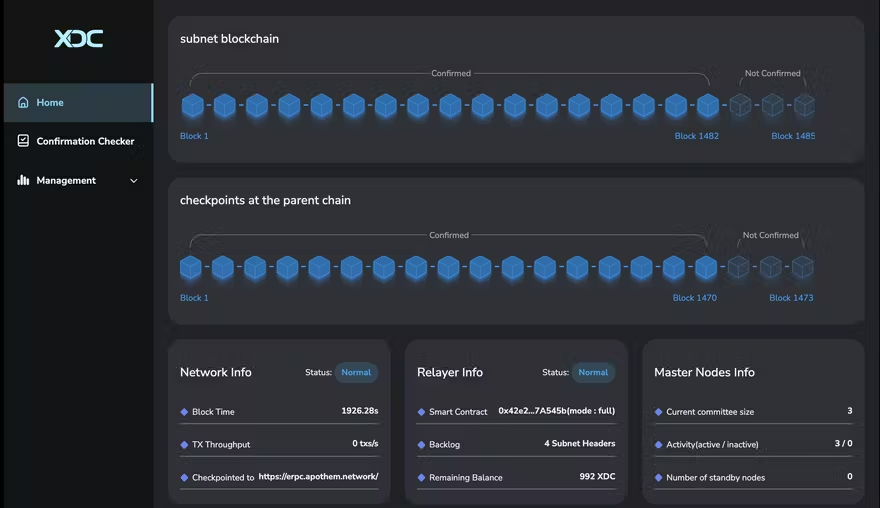
- Web dashboard to monitor validator performance and block production
- Block explorer to view transactions, token activity, and network health
- Relayer service that anchors subnet state to the XDC mainnet through the checkpoint smart contract
Each component is pre-integrated and requires no third-party setup. New users can monitor their subnet from launch without needing additional infrastructure or code changes.
Optional Cross-Chain Functionality via XDC-Zero
For teams building across multiple chains, XDC offers XDC-Zero, a framework for interoperability. It supports:
- Oracles for secure data feeds
- Endpoint and message routing between subnets
- A monitoring UI for tracking cross-chain activity
With XDC-Zero, assets and state can move securely between your subnet and the broader XDC ecosystem.
What is XDC Zero? 🌐
— XDC Foundation (@XDCFoundation) September 26, 2024
XDC Zero is the key to unlocking cross-chain communication across subnets. With features like an Oracle, Endpoint, Relayer, & an intuitive Frontend UI, it ensures secure & seamless data transmission between chains.
Learn more about XDC Zero 👇… pic.twitter.com/C4gDhJ3mav
AI Assistants for Custom Config and Contracts
While most of the setup is handled automatically, advanced users may want to customize validator logic, adjust Docker configurations, or write smart contracts for their subnet. Here, AI tools like Cursor, Replit, or Bolt.ai become valuable assistants. These platforms help generate and troubleshoot code, explain configuration files, and reduce the learning curve for non-developers. Used together with XDC’s tooling, they offer a complete workflow from idea to production.
Algorand: Build and Deploy Using Beginner-Friendly Tooling
Algorand offers powerful tools that simplify blockchain development for new builders. Whether you’re experimenting in a browser or deploying full applications from your desktop, Algorand’s tooling stack provides guided, accessible experiences without needing deep technical knowledge.
AlgoKit: Native Support for Python and TypeScript
AlgoKit is Algorand’s official toolkit for building blockchain applications locally. It provides native support for both Python and TypeScript, allowing developers to write smart contracts and supporting scripts in languages they already know.
Developers can scaffold projects, run local networks, deploy contracts, and debug applications—all from a single command-line interface. The toolkit includes:
- A local sandbox environment for testing
- Wallet creation and testnet faucet integration
- Deployment and update commands for testnet and mainnet
- A visual state explorer called Lora for inspecting contract logic
- High-quality templates for Python and TypeScript development
Python developers can build contract logic directly in Python without having to touch TEAL or PyTeal. TypeScript developers can use bundled templates to generate scripts and frontend integrations quickly.
AlgoKit’s structure and documentation make it ideal for solo developers, small teams, or educators looking to teach blockchain development in an accessible way.
AI Integration: Python and TypeScript Accelerate Prompt-Based Development
What makes Algorand’s toolkit especially AI-friendly is its use of popular, human-readable languages. Tools like Replit, Cursor, and Bolt.ai excel in helping users write, fix, and explain Python or TypeScript code through conversational prompts. These assistants can generate smart contracts in PyTeal, debug AlgoKit errors, or walk through logic step by step.
New builders can now launch and test contracts without learning everything from scratch. They can ask AI to write a Python function, and deploy it using AlgoKit—all in a guided flow. With minimal searching and fewer errors, these tools make blockchain development more efficient and less intimidating.
Used together, AlgoKit and modern AI coding assistants provide a strong foundation for building smart contracts with clarity and confidence.
EasyA: Mobile-First Learning for the Next Generation of Builders
EasyA is a mobile education platform that teaches users how to build in Web3 using short, interactive lessons. It focuses on practical learning, allowing users to write, test, and deploy smart contracts directly from their phones. The app is designed for beginners with no prior blockchain or coding experience.
How It Works
The platform offers structured learning tracks tailored to specific ecosystems like Algorand, Ethereum, and Polygon. Each track introduces smart contract basics, common use cases, and hands-on challenges.
Users can:
- Complete bite-sized lessons on Web3 topics
- Write code in a built-in editor
- Deploy to testnets with guided steps
- Get feedback and unlock new lessons as they progress
This creates a learn-by-doing environment where users build real experience while advancing through the app.
🤳 THE #ALGO SHOW: EasyA Showcase | Empowering 1M+ Builders
— Generation Infinity (@GenfinityIO) June 10, 2025
Join us for an exclusive feature on @easya_app with founders @kwok_phil & @dom_kwok — the platform where top developers build on the world’s leading blockchains.
🎙️ Powered by @AlgoFoundation https://t.co/Z8BcnR1ZWl
Ecosystem Integration
EasyA partners directly with blockchain foundations to ensure that its content stays current and aligned with official tooling. For example, the Algorand track guides users through deploying contracts using the same concepts found in AlgoKit or the IDE Playground. Other tracks follow similar workflows for Ethereum and other EVM chains.
Each track encourages users to use native tooling, helping them become familiar with industry-standard development paths.
Real-World Outcomes
EasyA also supports in-person learning by hosting university hackathons and startup competitions. These events connect users to mentors, builders, and funding opportunities.
The app has already helped thousands of users go from beginner to hackathon finalist. It’s an effective launchpad for those who want to build but don’t know where to start.
AI Coding Tools: Write, Learn, and Launch with AI by Your Side
The Role of AI in Web3 Development
Artificial intelligence is quickly becoming a co-pilot for new Web3 builders. Platforms like Replit, Cursor, Bolt.ai, and GitHub Copilot help users write smart contracts, build dApps, and solve errors—without requiring deep technical knowledge.
These tools work best with popular programming languages like Python and TypeScript, which are also supported by beginner-friendly Web3 toolkits like AlgoKit, OpenZeppelin, and Hardhat.
What AI Can Do for You
For a new builder, AI assistants can:
- Generate smart contract templates from plain English prompts
- Explain each function or contract line in detail
- Refactor or debug code with suggestions in real time
- Walk through deployments step-by-step
- Convert workflows across languages (e.g., from Python to TypeScript)
Even if you don’t know what to ask, these tools provide suggestions as you type—making the entire process more interactive and less intimidating.
Pairing AI with Blockchain Tooling
What makes AI especially valuable is how it complements the toolkits already covered in this article:
- In AlgoKit, AI can generate contracts and connect to deployment scripts.
- With Remix, AI can help create ERC-20 tokens or NFT collections.
- In Avalanche, AI can guide subnet creation or explain configuration options.
- With Euclid, AI can assist in customizing metagraph logic.
AI tools are available across devices and integrate into common editors like VS Code, Replit, or even mobile environments in apps like EasyA.
The result? A workflow where anyone can describe an idea and watch it come to life with the help of beginner-friendly tools and AI support.
so I vibe coded the same app I am looking to launch on @bolt vs @poofnew, and man, I am hella impressed with how web3 coding platforms are producing apps.
— serstaxx⚡️| Building Clarity (@SerStaxx) June 21, 2025
web3 coding platforms are enabling developers to create innovative and dynamic applications. The advancements in this… pic.twitter.com/uL5iWzHUTT
Web3 Is No Longer Just for Senior Developers
The barriers that once kept people out of blockchain development are falling fast.
You no longer need to master Solidity or run a local node to deploy a smart contract. With toolkits like Hedera Contract Builder, AlgoKit, Euclid SDK, and Avalanche CLI, creators can deploy tokens, launch private chains, or build decentralized apps in minutes. Platforms like EasyA make learning feel like a game, and AI coding tools fill in the gaps with real-time help.
Together, these tools and technologies redefine what it means to “build in Web3.” Whether you’re a founder with no technical background, a designer launching your first NFT, or a student experimenting with testnet tokens—this is your moment.
The age of code barriers is ending. Now, anyone with an idea can launch a blockchain app and learn along the way.
*Disclaimer: News content provided by Genfinity is intended solely for informational purposes. While we strive to deliver accurate and up-to-date information, we do not offer financial or legal advice of any kind. Readers are encouraged to conduct their own research and consult with qualified professionals before making any financial or legal decisions. Genfinity disclaims any responsibility for actions taken based on the information presented in our articles. Our commitment is to share knowledge, foster discussion, and contribute to a better understanding of the topics covered in our articles. We advise our readers to exercise caution and diligence when seeking information or making decisions based on the content we provide.